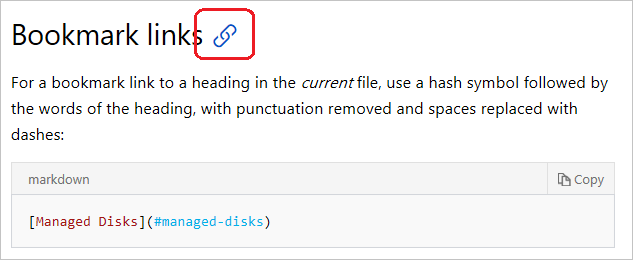

Markdown is one of the most widely used lightweight markup languages for writing on the web. Its simplicity, readability, and flexibility make it a favorite among developers, writers, and content creators. Among its many features, the markdown link is one of the most essential building blocks for connecting content across blogs, documentation, and websites. Understanding how to properly use a markdown link can significantly improve the structure, usability, and professionalism of your content.
This article takes a deep dive into everything you need to know about creating, formatting, and optimizing markdown links for different use cases.
What is a Markdown Link?
A markdown link is a simple way to create clickable hyperlinks using plain text syntax. Instead of using complex HTML tags, Markdown allows you to embed links in a clean and readable format.
The basic structure of a markdown link looks like this:
For example:
This creates a clickable link labeled “OpenAI” that directs users to the OpenAI website.
The simplicity of the markdown link syntax is what makes it so powerful. It allows writers to focus on content without worrying about heavy HTML formatting.
Why Markdown Links Are Important
A markdown link plays a crucial role in modern content creation for several reasons:
First, it improves readability. Unlike HTML anchor tags, markdown links are clean and easy to understand even in raw form. This makes collaborative writing and version control much easier.
Second, markdown links are platform-independent. Whether you’re writing in GitHub, Notion, static site generators, or documentation tools like Docusaurus, the same markdown link syntax works seamlessly.
Third, they enhance SEO and user experience. Proper use of markdown links helps search engines understand content relationships while guiding readers to relevant resources.
Finally, markdown links are essential for maintaining structured documentation. Technical writers rely heavily on markdown link formatting to connect sections, external references, and internal pages.
Basic Syntax of a Markdown Link
The standard markdown link format consists of two main parts:
Link text: The visible clickable text
URL: The destination address
Example:
When rendered, this becomes a clickable link.
You can also use a markdown link with titles (hover text), which adds extra context:
When users hover over the link, they see the tooltip “GitHub Homepage.”
This small feature of markdown link formatting enhances accessibility and user experience.
Types of Markdown Links
There are several variations of the markdown link depending on the use case.
Inline Markdown Links
Inline links are the most common type. They are placed directly within the text.
Example:
Learn more about version control on GitHub.
This is ideal for blog posts and articles where context matters.
Reference-Style Markdown Links
Reference-style links separate the URL from the text for better readability in long documents.
Example:
Learn more about GitHub here.
This markdown link style is especially useful in technical documentation where repeated links are used.
Automatic Links
Markdown also supports automatic link creation when a URL is placed directly in the text:
Some markdown processors automatically convert this into a clickable markdown link.
Best Practices for Using Markdown Links
To make the most of markdown link formatting, you should follow certain best practices.
First, always use descriptive link text. Instead of writing “click here,” use meaningful text like “download the documentation” or “view the API guide.” This improves accessibility and SEO.
Second, avoid overloading paragraphs with too many markdown links. Too many links can distract readers and reduce readability.
Third, ensure all markdown links are valid and up to date. Broken links harm user experience and reduce credibility.
Fourth, use relative links for internal navigation in websites or documentation projects. For example:
This makes your markdown link more portable across environments.
Common Mistakes When Using Markdown Links
Even though markdown link syntax is simple, users often make mistakes.
One common error is forgetting parentheses or brackets. A correct markdown link must always follow the text format.
Another mistake is inserting spaces incorrectly:
Incorrect:
[OpenAI] (https://openai.com)
Correct:
OpenAI
Some users also misuse URLs without proper formatting, which leads to broken rendering.
Additionally, overusing raw URLs instead of proper markdown link text reduces professionalism in writing.
Markdown Links in Blogs and Websites
In blogging platforms, a markdown link helps improve navigation and engagement. Bloggers often use markdown links to connect related posts, sources, and external references.
For example:
If you’re writing about SEO, you might include a markdown link to an official Google resource or a related blog post.
In static site generators like Jekyll, Hugo, or Gatsby, markdown link usage is essential for structuring site navigation and internal linking strategies.
Well-placed markdown links also increase time-on-site by guiding readers to additional valuable content.
Markdown Links in Documentation
Technical documentation relies heavily on markdown links. They are used for:
Connecting API references
Linking to installation guides
Referencing external libraries
Navigating between sections
For example:
See the authentication guide for more details.
Without markdown link functionality, documentation would become fragmented and harder to navigate.
Advanced Markdown Link Techniques
Once you master the basics, you can explore advanced markdown link techniques.
One such technique is combining markdown links with images:
This creates a clickable image using markdown link syntax.
Another advanced method is using footnote-style links in extended documentation systems, which helps reduce clutter in long-form writing.
Some platforms also support link attributes like “nofollow” or “target blank,” although this depends on the markdown processor.
The Role of Markdown Links in Modern Web Development
The markdown link is more than just a formatting tool; it is a foundational element in modern content ecosystems.
Developers use markdown link structures in Git repositories, README files, and changelogs. Content creators use them in blogs and newsletters. Educators use them in digital learning materials.
Because markdown is widely supported, the markdown link has become a universal standard for lightweight hyperlinking.
Conclusion
The markdown link is one of the most powerful and essential features of Markdown syntax. Its simplicity, flexibility, and wide compatibility make it indispensable for writers, developers, and digital creators.
Whether you’re building a blog, writing technical documentation, or managing a website, mastering the markdown link will help you create cleaner, more professional, and more user-friendly content.
By understanding its syntax, types, best practices, and advanced techniques, you can fully leverage the power of markdown link formatting to improve both readability and functionality in your digital projects.